6 Mayıs 2024 Pazartesi

Intel Graphics Driver 31.0.101.5445 (x64)

 

Intel Graphics Driver 31.0.101.5445 (x64)

Intel Graphics Driver 31.0.101.5445 (x64)

File Size : 779 mb

Intel’s latest graphics driver release supports Intel’s® newest 8th Generation Core Processors, introducing Intel® UHD Graphics, with the ability to immerse you in leading-edge 4K UHD entertainment from your laptop for up to 10 hours. Along with several security fixes, this driver also optimizes system idle state to reduce power consumption.

Relive the Terran* vs. Protoss* vs. Zerg* battles of old, in StarCraft Remastered* enjoyed in up to stunning 4K UHD. Obliterate enemies in Quake Champions* (Early Access), or embark on an adventure at release of the latest games, Life is Strange: Before the Storm*, Batman: The Enemy Within – The Telltale Series*, Crossout*, The Long Dark*, and Slime Rancher* on processors with Intel® HD Graphics 620 or better.
Emerge victorious or blaze past the finish line on the latest titles like Lawbreakers*, Tacoma*, and F1 2017* on Intel® Iris™ Pro Graphics.

Check out the all new look and feel of gameplay.intel.com, where you’ll find recommended game settings for many of your favorite PC games.

Install the Intel® Driver Update Utility, which now automatically checks for drivers on a regular basis and can provide notifications when new drivers are available.

This document provides information about Intel’s Graphics Driver for

8th Generation Intel® Core™ processors with Intel® UHD Graphics 620.

7th Generation Intel® Core™ processors, related Pentium®/ Celeron® Processors, and Intel® Xeon® processors, with Intel® Iris™ Plus Graphics 640, 650 and Intel® HD Graphics 610, 615, 620, 630, P630.

6th Generation Intel® Core™ processors, Intel Core™ M, and related Pentium® processors, with Intel® Iris™ Graphics 540, Intel® Iris™ Graphics 550, Intel® Iris™ Pro Graphics 580, and Intel® HD Graphics 510, 515, 520, 530.

Intel® Xeon® processor E3-1500M v5 family with Intel® HD Graphics P530

Pentium®/ Celeron® Processors with Intel® HD Graphics 500, 505

Whats New

Homepage

FastStone Image Viewer v7.8

Features

 
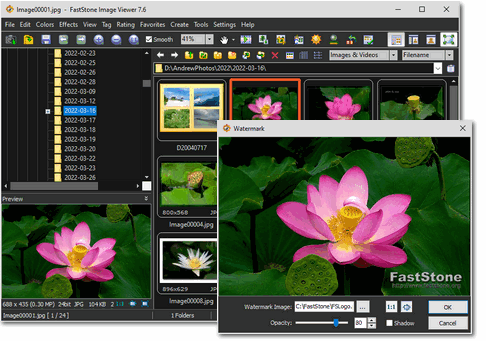
  • Image browser and viewer with a familiar Windows Explorer-like user interface
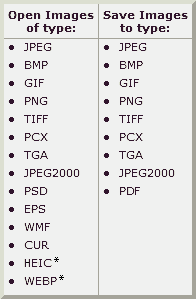
  • Support of many popular image formats
     
     * Note: HEIC and WEBP are supported by Windows Imaging Component (WIC) codecs on Windows 10 / 11

  • True Full Screen viewer with convenient image zoom support and unique fly-out menu panels
  • Crystal-clear and customizable one-click image magnifier
  • Powerful image editing tools: Resize/resample, rotate/flip, crop, sharpen/blur, adjust lighting/colors/curves/levels etc.
  • Eleven re-sampling algorithms to choose from when resizing images
  • Image color effects: gray scale, sepia, negative, Red/Green/Blue adjustment
  • Image special effects: drop shadow, framing, bump map, sketch, oil painting, lens
  • Draw texts, lines, highlights, rectangles, ovals and callout objects on images
  • Clone Stamp and Healing Brush
  • Superior red-eye effect removal/reduction with completely natural looking end result
  • Multi-level Undo/Redo capability
  • Single click to switch between best fit and actual size mode
  • Image management, including file tagging, rating and drag-and-drop to copy/move/re-arrange files
  • Histogram display with color counter feature
  • Compare images side-by-side (up to 4 at a time) to easily cull those forgettable shots
  • Image EXIF metadata support (plus comment editing for JPEGs)
  • Configurable batch processing to convert/rename large or small collections of images
  • Slideshow with 150+ transition effects and music support (MP3, WMA, WAV...)
  • Create efficient image attachments for emailing to family and friends
  • Print images with full page-layout control
  • Create fully configurable contact sheets
  • Create memorable artistic image montages from your family photos for personalized desktop wallpapers (Wallpaper Anywhere)
  • Acquire images from scanners. Support batch scanning to PDF, TIFF, JPEG and PNG
  • Versatile screen capture capability
  • Powerful Save As interface to compare image quality and control generated file size
  • Run favorite external editors with one keystroke from within Image Viewer
  • Offer portable version of the program which can be run from a removable storage device
  • Configurable mouse wheel support
  • Support themes (bright, gray and dark)
  • Support dual-monitor configurations
  • Support touch interface (tap, swipe, pinch)
  • Support dual instances
  • Play video and audio files (Third party codecs may be required for old versions of Windows)
  • And much more... 


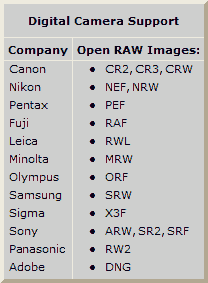
FastStone Image Viewer is a fast, stable, user-friendly image browser, converter and editor. It has a nice array of features that include image viewing, management, comparison, red-eye removal, emailing, resizing, cropping, retouching and color adjustments. Its innovative but intuitive full-screen mode provides quick access to EXIF information, thumbnail browser and major functionalities via hidden toolbars that pop up when your mouse touches one of the four edges of the screen. Other features include a high quality magnifier and a musical slideshow with 150+ transitional effects, as well as lossless JPEG transitions, drop shadow effects, image annotation, scanner support, histogram and much more. It supports all major graphic formats (BMP, JPEG, JPEG 2000, animated GIF, PNG, PCX, PSD, EPS, TIFF, WMF, ICO, CUR and TGA) and popular digital camera RAW formats (CR2, CR3, CRW, NEF, NRW, PEF, RAF, RWL, MRW, ORF, SRW, X3F, ARW, SR2, SRF, RW2 and DNG).

No Adware. No Spyware.
Free for Home Users

Version 7.8

download 2023-09-28


What's New

HFS: HTTP File Server (version 3) 0.52.5


HFS is a HTTP file server that allows you to share files on the Internet fast and easy, allowing clients to download them via a clean and simple website.The application basically turns your computer into a HTTP server and all users who wish to connect and download files can do that by loading a simple webpage in their browser.

HFS comprises a wide array of configuration settings, so you can change basically every single part of the application, starting with the way users download files and ending with the appearance of the created webpage.

The program thus allows you to set the IP address you wish to use, enable download limits and block the connected clients from using their download managers, set up the virtual file system, decide how to upload files and configure the behavior of the tray icon.

If you wish to upload new files, it's enough to drag them in the main window of the tool. On the other hand, right clicking in the left panel also offers you the option to share a whole folder, be it virtual or real.

The interface comes with two different modes, “Expert” and “Easy”, with the first one providing not only a detailed graph to track the server traffic, but also several statistics such as the number of connections and upload / download speed.

Of course, HFS lets you set up user accounts and grant access only to some defined folders, but you can also kick or ban clients and even pause their downloads. As said, there are also dedicated tools to limit download speed and you can even block users from using download managers.

The number of features is absolutely impressive; you need a few days to really discover all its goodies. It runs on low computer resources and works on all Windows versions.

As a conclusion, this is one of the best ways to share files over the Internet and since it packs so many great features, it is definitely a top product.

Features
Download and upload
Virtual file system
Highly customizable
HTML template
Bandwidth control
Easy/Expert mode
Log
Full control over connections
Accounts
Dynamic DNS updater

Whats New

Homepage

24 Şubat 2024 Cumartesi

Google Earth Pro 7.3.6.9796 Multilingual

 Google Earth Pro 7.3.6.9796 Multilingual


Google Earth - a fresh assembly of the popular client software to work with three-dimensional model of the Earth, created on the basis of high resolution satellite images. Using genuine opportunity to change the scale of images (sometimes down to individual houses), and much more, including the coordinates of an object. The map can be rotated to any angle, most of the maps - these are ordinary 2D-pictures, but some objects (settlements) are presented in the form of three-dimensional models. Google Earth gives you a wealth of photographic, geographic and astronomical information.

Here are some key features of Google Earth
- Navigation controls - Look around, move and zoom into any location
- Sun and shadows - View animated shadows as they move across the landscape
- 3D buildings - View hundreds of photo-realistic new buildings in many of the world's cities
- Imagery date tupo scopirovali ot suda rl-team.net information
- Support for new language versions
- Flash videos in placemark balloons
- Fly from space to your neighborhood. Type in an address and zoom right in
- Search for schools, parks, restaurants, and hotels. Get driving directions
- Tilt and rotate the view to see 3D terrain and buildings
- Save and share your searches and favorites. Even add your own annotations


67 mb. 


homepage x86 - homepage x64

18 Ocak 2024 Perşembe

Winter morning smoke out from big chimney - Stock Photo


Winter morning smoke out from big chimney

Winter morning smoke out from big chimney

By xewex

This stock photo is 4608px by 3456px. Ideal for any project that requires air condition, background, beautiful.

Winter morning smoke out from big chimney