3 Mart 2020 Salı

Quick CPU v3.2.4.0 - 01 March 2020

https://coderbag.com/product/quickcpu

Quick CPU

(Core Parking Manager v3)
Device
Latest Version: 3.1.4.0  -  Released: 3/1/2020


19 Şubat 2020 Çarşamba

Windows Repair Toolbox v3.0.22

Windows Repair Toolbox

(Almost) everything you need to repair Windows problems in one small handy tool.
wrt-1
Previous
Next

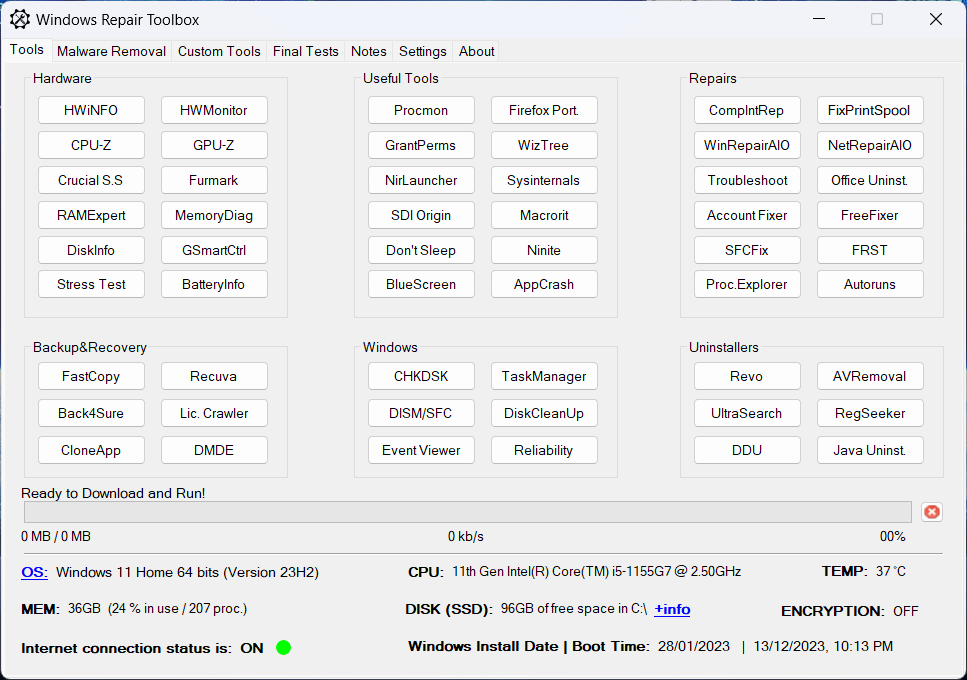
Windows Repair Toolbox (freeware) is a portable program that helps you repair a Windows system, by making the process faster, easier and more consistent.


Features:
– Download and run “on-the-fly” the best free software when it comes to diagnose and solve several kinds of Windows problems. With two exceptions, all the programs included in the toolbox are portable. The tools are categorized by their function, and the program will automatically download the correct version for the Windows edition in which you’re working. Additionally, it will also help you keeping those tools updated. Important note: some of the tools may trigger false positive alerts from your AV (e.g: the Nirsoft tools). – Ability to download all the tools at once (and also to keep them updated) with 1-click so that you can use the toolbox in offline computers, or simply to have all the tools already downloaded in advance.
– Ability to select several tools to run successively in unattended mode, in order to perform malware removal, system cleaning and repair. A email letting you know that the process is complete, and containing the logs, can be sent to you.
– Displays relevant information about the computer to be repaired: CPU temperature, name and % time; amount of RAM installed on the system and % of use; Disk model, capacity, basic health check; amount of free space left in the system partition; Windows edition and install date; System boot time; and more.
– Contains a functionality – “AVLeftovers” – that helps to identify what antivirus have been previously installed in a machine, so that you can run the respective manual uninstaller(s) before installing other antivirus of your choice, or simply when trying to solve some problem potentially caused by the incomplete uninstall of a security solution.
– Allows you to add your own favorite tools to the program;
– Allows you to change the program icon and title bar text;
– Allows you to perform quality assurance tests after the repair is complete;
– Allows you to save notes about the repair process;
– Provides 1-click access to some useful Windows tools;

Disclaimer (read carefully):
By running Windows Repair Toolbox you accept COMPLETE responsibility for ANYTHING that happens. This tool has ZERO WARRANTY for any purpose. Run it AT YOUR OWN RISK.
All 3rd-party tools you might download using Windows Repair Toolbox belong to their respective owners and authors, and are bound by their respective licences.
It is YOUR RESPONSIBILITY to determine if you have the rights to use those 3rd-party tools in whatever environment you use this software.

Requirements: .NET Framework 4, Windows XP through Windows 10.
Click to download the latest version of WRT (2.90 MB)
-The program doesn’t require installation, just extract it to a folder-
Program version:  3.0.2.2 (19.02.2020)
Definitions version: 1.5.3.4 (19.02.2020)

Windows Repair Toolbox - .zip download

SHA256 (zip): F7442D03AC108D82B605B61976B0CA9EF29F292D25DEEEA6ADA4BEEFFE5800B1
Downloads: 1,113,385

Adobe Camera RAW 12.2 - February 2020 Update

Adobe Camera Raw 12.2 | February 2020


The February 2020 release of Adobe Camera Raw (version 12.2) rolls out new features such as improved Raw default settings, more GPU-accelerated editing, and eGPU-powered Enhance Details. The release also adds support for new cameras and lenses and fixes several issues.

Improved Raw default settings


Customize your default adjustments for Raw files in the Raw Defaults panel of Camera Raw Preferences dialog box. Choose among Adobe Defaults, Camera Settings, or your own preset.

Raw Default settings
Raw default settings

More GPU-accelerated editing


Full GPU acceleration now speeds up Lens Correction and Transform adjustments.


eGPU-Powered Enhance Details


Enhance Details now supports external GPUs (eGPUs) on macOS 10.15 for faster processing.


For the full list of supported cameras and lens profiles, see these resources:

Camera Raw updates


Adobe DNG Converter


16 Ocak 2020 Perşembe

Windows Movie Maker 2020 Free

Windows Movie Maker 2020 Free Download

Click to download Windows Movie Maker With Windows Movie Maker, you can quickly turn your photos and videos into polished movies. Add special effects, transitions, sound, and captions to help tell your story. Share the movie with friends and family.

Windows Movie Maker 2020
Download Windows Movie Maker 2020

Get old versions


Windows Movie Maker is a easy-to-use & powerful video creating/editing software application, designed for latest Windows7, Windows 8, Windows 10. The old version works for Windows Xp and Vista. Windows Movie Maker contains features such as effects, transitions, titles/credits, audio track, timeline narration, and Auto Movie. New effects and transitions can be made and existing ones can be modified using XML code. Windows Movie Maker is also a basic audio track editing program. Windows Movie Maker can apply basic effects to audio tracks such as fade in or fade out. The audio tracks can then be exported in the form of a sound file instead of a video file.
TopWin-Movie-Maker.com is a website to download Windows Movie Maker for Windows XP, Windows Vista, Windows 7, Windows 8, Windows 10. All setup packages are standalone install packages. No need to download files via Internet during the installation. Test Compatible for Windows XP, Vista, 7, 8, 10. Software has been scanned by popular anti-virus software avast! and AVG. Note: We are not affiliated with Microsoft. The windows movie maker software is also available on microsoft official site click here
Download Windows Movie Maker 2020

Check old versions
 

18 Aralık 2019 Çarşamba

Intel® Driver & Support Assistant Version: 19.12.50.5 (Latest) Date: 12/17/2019

Intel® Driver & Support Assistant

Version: 19.12.50.5 (Latest) Date: 12/17/2019


Automatically update your drivers

Identify your products and get driver and software updates for your Intel hardware.

Available Downloads

https://downloadmirror.intel.com/28425/a08/Intel-Driver-and-Support-Assistant-Installer.exe

Intel-Driver-and-Support-Assistant-Installer.exe

Windows 10, 32-bit*
Windows 10, 64-bit*
Windows 8.1*
Windows 8.1, 32-bit*
Windows 8.1, 64-bit*
Windows 8*
Windows 8, 32-bit*
Windows 8, 64-bit*
Windows 7*
Windows 7, 32-bit*
Windows 7, 64-bit*
Multi language
2.32 MB
95833025f5f334e32576941b94c042cb

Detailed Description

Purpose
The Intel® Driver & Support Assistant enables you to scan computing devices for the latest drivers available from Intel. This tool has the main interface hosted on Intel’s support website and provides a more integrated support experience to users. It has an enhanced detection engine to ensure that customers are given complete and accurate information and a scan frequency option to change from a “run-once” tool to a persistent experience that can provide customers with driver updates more quickly.
Products supported: Graphics drivers, wireless networking, Intel® NUCs, and Intel® Compute Sticks
Issues with upgrading Intel® Driver & Support Assistant to a newer version? Please try our Uninstaller.
Required to install and use utility
  • A broadband Internet connection is required to use this utility.
  • Operating system requirements for installation: This application installs on Windows 7*, Windows 8*, Windows 8.1*, and Windows® 10.
  • We recommend performing a Windows* update to bring your operating system up to date with the latest .NET.
  • This application does not support Internet Explorer* browser. We recommend using Chrome*, Firefox*, or Edge* (version 44.17763/18.17763 or newer) browsers.
Instructions for launching
  1. Uninstall any previous versions (optional).
  2. Download and save locally on your device.
  3. Double-click Intel® Driver & Support Assistant Installer.exe file.
  4. Read and agree to the license terms and conditions
  5. Select Install.
  6. Click Launch button; the tray icon will start and automatically opens default browser 
What's new in version 19.12.50.5?
  • General bug fixes and improvements
  • Fixed an issue that prevented IDSA from working correctly in PRC
  • Improved error messages
  • Detection improvements for Intel SSDs
What's in  previous version 19.11.46.6?
  • Improved detection of BIOS version for Intel® NUCs
  • Enhanced support for non-English versions of Microsoft Windows
  • General bug fixes and improvements
Languages supported: Chinese, English, French, German, Japanese, Italian, Korean, Portuguese (Brazilian), Russian, and Spanish
Related topic
Intel® Driver & Support Assistant FAQs

2 Kasım 2019 Cumartesi

Japon fotoğraf ekipmanı üretim sektörü kendi tekelleşmişliği içinde kendini katletmektedir !..


Japon fotoğraf ekipmanı üretim sektörü tekelleşmiş ve kendi tekelinde kendisini batırmıştır bence. Aynasız da olsa, taktik aynı d-slr taktiği ile sürdürülüyor. Bu nedenle aynasızların da çöküşü d-slr'dan çok daha hızlı gelecek eğer Japon fotoğraf sektörü hakikatli adımlar atıp fotoğraf makinalarına güncel ihtiyaçları karşılayacak önemli yenilikler eklemezlerse.

Hala "koca sensör verdik ya lan, daha ne istiyorsun" havasında bir 4K videoyu bile zor zahmet ve veriyorum diye ne paralar istiyor, yetmiyor bir de "iyi çekebilcez" diye 2-3 tane de fotoğraf makinasının 2-3 katı fiyata iyi lensler alıyoruz (kimi zaman) !.. Hele foto makinalarındaki işletim sistemleri (firmware) tam bir abaküs gibi kaldılar artık günümüzde. Bu kadar yeteneksiz bir alet yapıyorsunuz bari işletim sistemi ile kullanıcısını memnun edin. Fakat yoook, ne bileyim panorama modu olmaz, olsa bir kabızdır, internete bağlanamaz, hele bir wi-fi falan ile cep tele bağlanacak bazı modellerde öyle felaket ki bu wi-fi ile diğer cihazlara bağlanması sanırsınız 14k modem ile sabit hattı arayıp internete bağlanıyoruz eğer hat parazitsiz ise bağlantımız kesilmez umarım ! Koydukları 1100-1200 mah bir batarya ile 350 foto çekenine şükür eder olduk, Canon EOS M'in bazı modelleri 250 kare falan çekiyor mesela !.. Öteki Çin'li dandik mal üreticisi bundan çoook daha küçücük cep telefonunda 3500-4500 mah pil veriyor. İşletim sistemi desen yok yok, hem laptoplara, hem bilgisayarlara ve hem de fotoğraf makinalarına rakip olan bir "akıllı telefonu bize 2000-3000 lira bandında sunuyor. Japon'a gittim mi daha sadece gövdesini 3.000 liraya alabildiğimiz güncel bir fotoğraf makinası kalmadı piyasada !.. Hele bazı yeni çıkan çok da aşırı şeyler olmayan modeller 8-10 bin liralarda !!!

Kendilerini müthiş bir uzay aracı veriyoruz zannediyorlar. Verdiği tek şey büyük sensör, o kadar. Onu da tek başına veya hele kit lensle kimse beğenmiyor. Çin veriyor mercimek sensör amma 3-5 tane görüntü algılayıcı var. 8 çekirdekli işlemci artık minimum 4gb. ram 64 gb. rom, müzik çalar, radyo dinler, film çeker, foto çeker, oyun oynatır, hatta uygulamalar ile dükkan açar profesyonel iş bile yaparsınız. Fotoğraf makinası nedir arkadaş ? Dipsiz kuyu, veeer veeeer ver doymak bilmez para tuzağı bir canavar gibi !.. Haa bitti mi ? Yoo, bir de öküz başı kadar büyük olacak, lensleriyle birlikte sırt çantasıyla hamal gibi gezeceksin, her gördükleri yerde "Çekme, yasak, çekemezsin" diyecekler :) Sana kala kala dağ-taş, sümüklü çocuk ve buruşuk nine-dede fotoları çekmek kalacak da sen de bunu hobi, zevk, keyif diye yaptığını söyleyeceksin !!! Bence acil bir psikoloğa görün yada artık psikiyatr servisine mi yatırırlar bilmem o kadarını 😋